Once Traefik is terminating TLS for everything, the next quiet question is who gets to knock on the door. Firewall rules help, auth helps, but a lot of the internet is still happy to spray CVE probes and credential stuffing at anything that answers on 443.
CrowdSec is the piece I put in front for that. It reads Traefik access logs, shares signals with a wider community blocklist, and tells a Traefik bouncer when an IP should be shown the door. This write-up is the path I use on the home lab - Compose, the Traefik plugin, enrolment, bans, and a small web UI. There is also a shorter CrowdSec docs page if you just want the reference shape.
Credit where it is due: this Traefik + CrowdSec guide was a useful starting point while I was wiring mine up.
Why bother
A few things sold me on it:
- The community blocklist gives you protection from known-bad IPs on day one. Thousands of CrowdSec instances feed attack data, and the curated list lands on every enrolled box.
- Ban decisions propagate to every bouncer on the same LAPI. An IP banned for SSH brute-force can get blocked on web traffic too, not only on the service that noticed first.
- The
crowdsecurity/http-cvecollection watches HTTP requests for known CVE exploit patterns - useful when Traefik is the public face of a pile of apps.
CrowdSec depends on Traefik already running and writing logs. Keep them in the same Compose so CrowdSec can start after Traefik, or be ready to restart CrowdSec once Traefik is up. Otherwise it sits there with nothing useful to parse.
Compose
services:
  crowdsec:
    image: crowdsecurity/crowdsec:latest
    container_name: crowdsec
    restart: unless-stopped
    environment:
      COLLECTIONS: "crowdsecurity/traefik crowdsecurity/http-cve"
      BOUNCER_KEY_traefik: "${CROWDSEC_BOUNCER_KEY}"
    volumes:
      - ./acquis.yaml:/etc/crowdsec/acquis.yaml:ro
      - ./db:/var/lib/crowdsec/data
      - ./config:/etc/crowdsec
      - /opt/appdata/traefik/logs:/var/traefik/logs:ro

networks:
  default:
    name: proxy
    external: true
Point the Traefik logs volume at wherever your Traefik stack actually writes access.log. The containers need to share the proxy network so the bouncer can reach CrowdSec's LAPI.
acquis.yaml
Tell CrowdSec which logs to read:
# acquis.yaml
source: file
filenames:
  - /var/traefik/logs/access.log
labels:
  type: traefik
There is a Docker-socket acquis option too. I left it commented while I was getting the file source working - same Traefik logs, different plumbing.
# source: docker
# container_name:
#   - traefik
# labels:
#   type: traefik
Generate a bouncer key inside the CrowdSec container:
cscli bouncers add traefik-bouncerPut that value into CROWDSEC_BOUNCER_KEY (and later into the Traefik middleware config).
Traefik configuration
I use the crowdsec-bouncer-traefik-plugin rather than a separate bouncer container. Traefik loads it as an experimental plugin, then a middleware talks to CrowdSec's LAPI.
In traefik.yaml, make sure access logs exist and register the plugin:
log:
  level: INFO

accessLog:
  filePath: /var/traefik/logs/access.log
  bufferingSize: 100

experimental:
  plugins:
    crowdsec-bouncer:
      moduleName: github.com/maxlerebourg/crowdsec-bouncer-traefik-plugin
      version: "v1.6.0"
In the dynamic config.yml, define the middleware:
middlewares:
  crowdsec:
    plugin:
      crowdsec-bouncer:
        enabled: true
        crowdsecLapiUrl: http://crowdsec:8080
        crowdsecLapiKey: key-generated-from-crowdsec
        updateIntervalSeconds: 15
        defaultDecisionSeconds: 300
        crowdsecMode: live
        forwardedHeadersTrustedIPs:
          - 172.16.0.0/12
          - 192.0.0.0/8
Swap crowdsecLapiKey for the key from cscli bouncers add.
Applying it
Globally, hang it off the secure entrypoint the same way you might attach security headers:
entryPoints:
  websecure:
    address: ":443"
    http:
      middlewares:
        - crowdsec@file
Or per router, with a label:
traefik.http.routers.myapp.middlewares=crowdsec@fileOnce it is talking, check the bouncer list looks healthy:

Enrol with the CrowdSec console
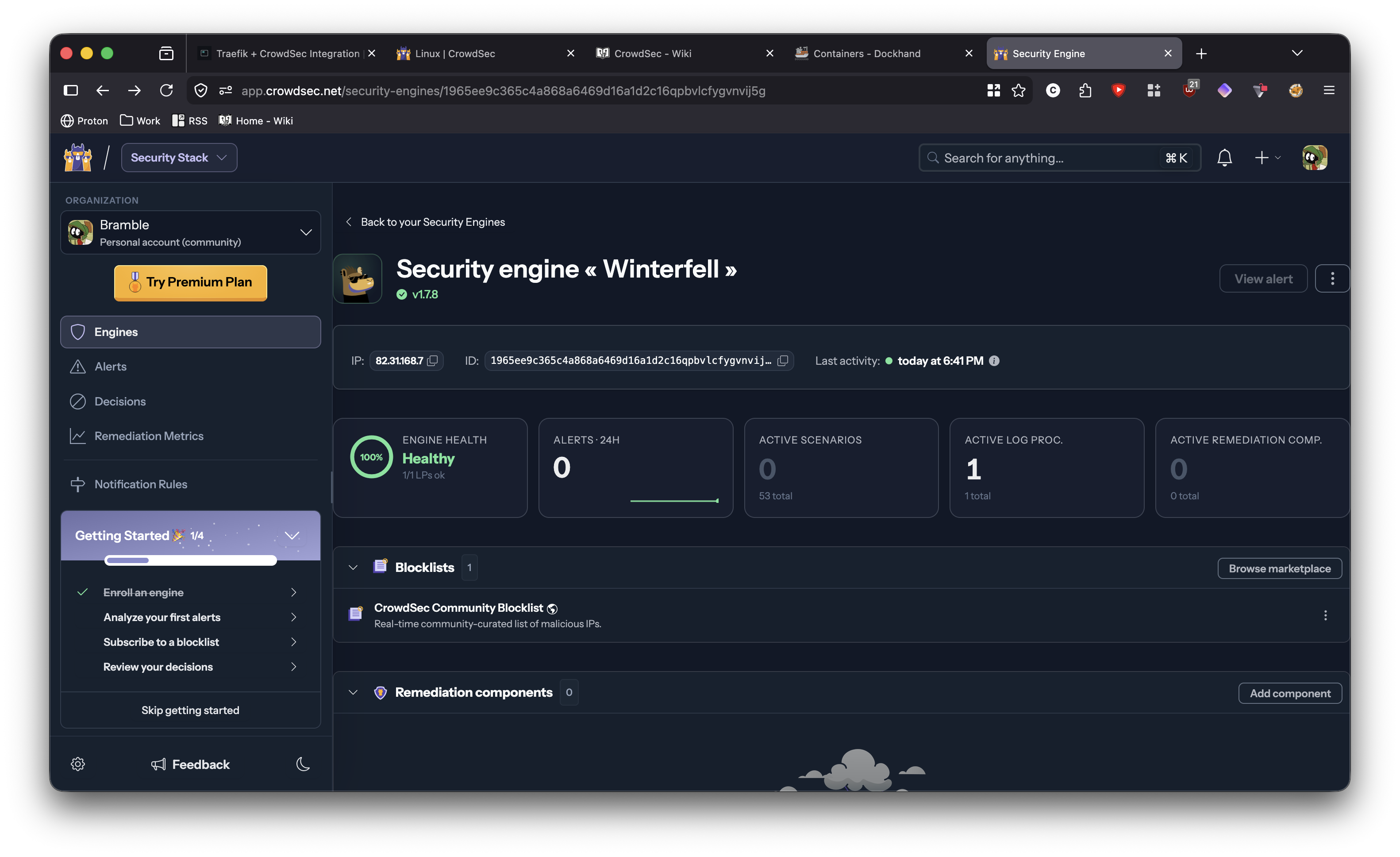
Pair the instance to the dashboard so you get the community blocklist and a nicer place to look at decisions:
cscli console enroll -qFollow the prompt, accept it in the console, and you are on the shared list.
Protection and banning
Manual bans are handy for testing, or for something you spotted yourself:
cscli decisions add -i 1.2.3.4 -d 5m -t banLift it again:
cscli decisions delete -i 1.2.3.4See what is currently banned:
cscli decisions list
Collections currently loaded:
cscli collections list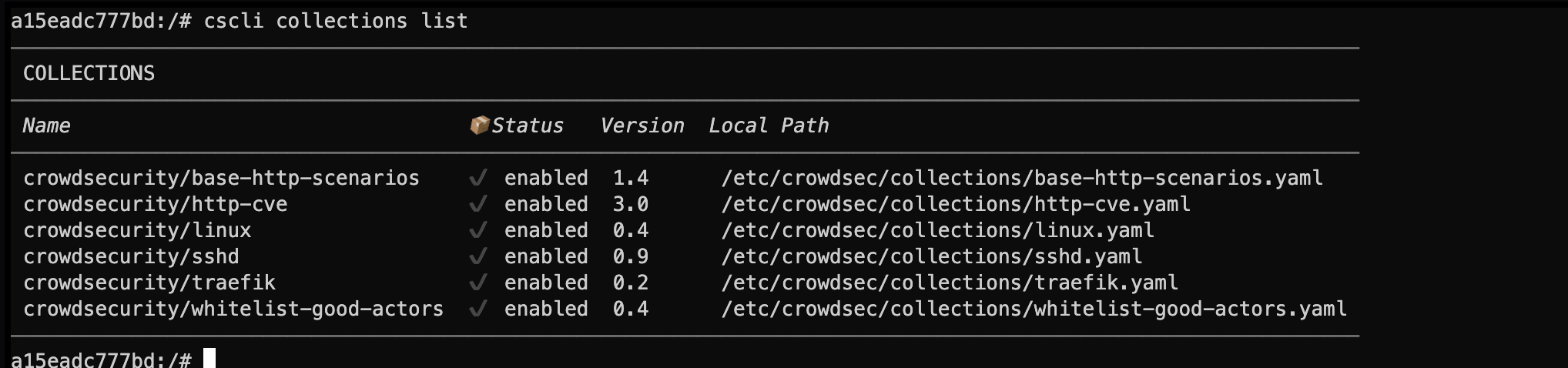
And metrics - useful for confirming the engine is parsing logs and actually seeing hits:
cscli metrics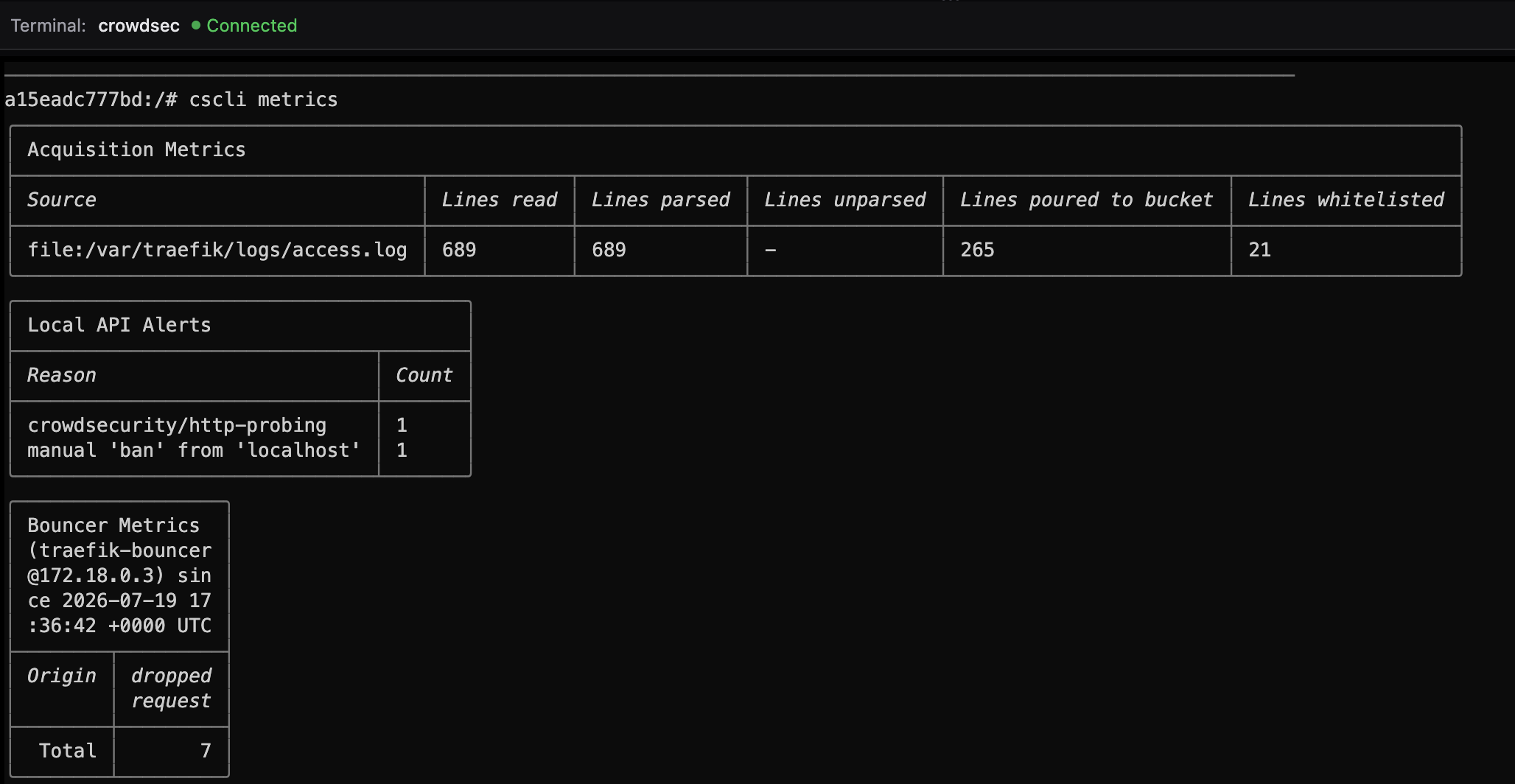
Whitelisting
Local clients can get banned too if you hammer your own apps during testing. Allowlist the ranges you trust before that becomes a self-own:
docker exec crowdsec cscli allowlist create allowlist -d 'Local IPs'
docker exec crowdsec cscli allowlist add allowlist 192.168.0.0/16   # home LAN (adjust to yours)
docker exec crowdsec cscli allowlist add allowlist 100.64.0.0/10   # Tailscale CGNAT range
docker exec crowdsec cscli allowlist add allowlist 10.0.0.0/8      # private / lab ranges you use
The list is named allowlist, which is easy to confuse with the command itself. Inspect it with:
docker exec crowdsec cscli allowlist inspect allowlistYou should see your ranges listed with no expiry if you added them as permanent entries.
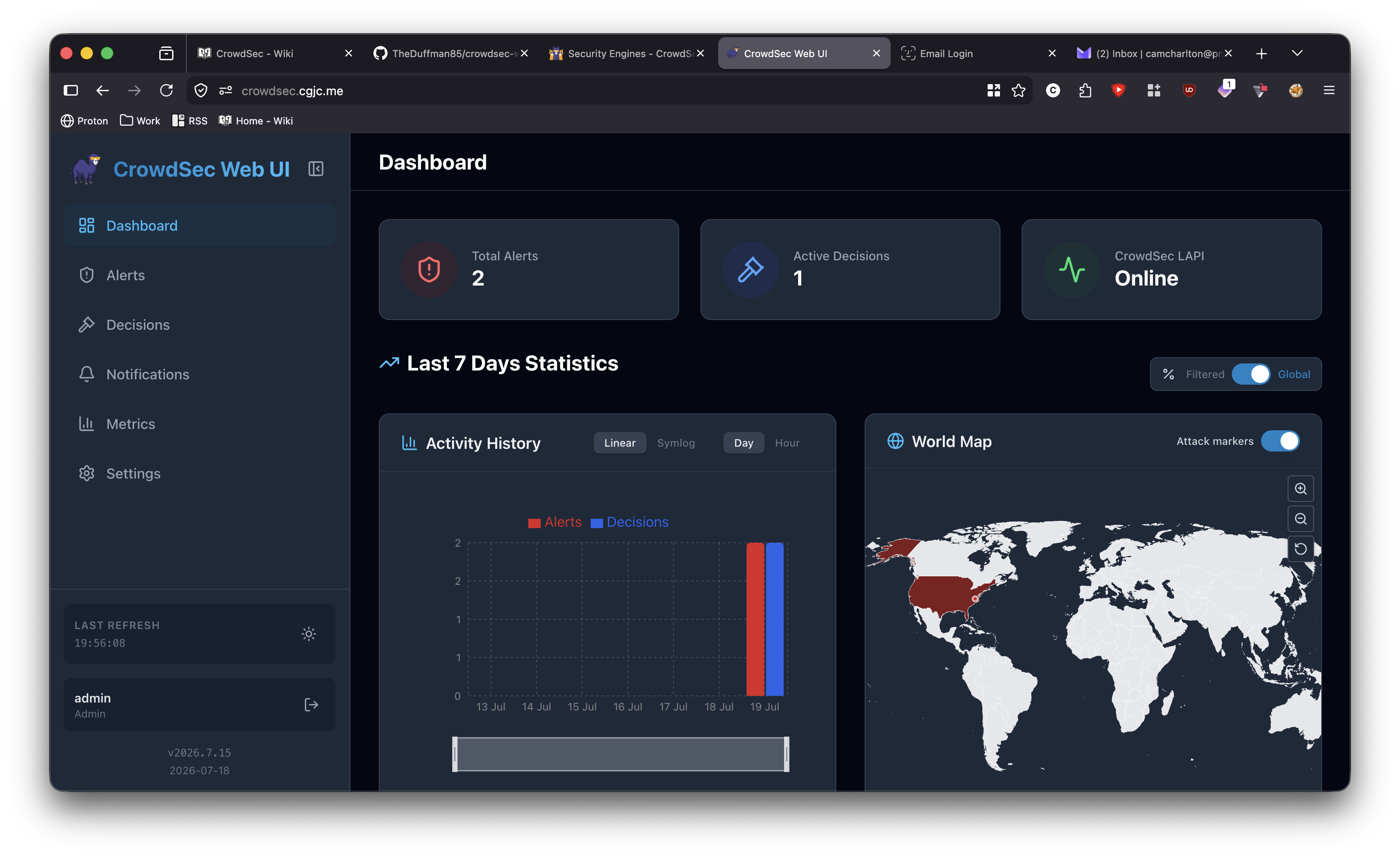
A small web UI
CLI is fine until you want a dashboard. I tried crowdsec-web-ui.
Create a machine account and a random password:
openssl rand -hex 32
docker exec crowdsec cscli machines add crowdsec-web-ui --password <generated_password> -f /dev/null
Then add the UI service (same Compose / network as CrowdSec):
crowdsec-web-ui:
  image: ghcr.io/theduffman85/crowdsec-web-ui:latest
  container_name: crowdsec-web-ui
  ports:
    - "3000:3000"
  environment:
    - CROWDSEC_URL=http://crowdsec:8080
    - CROWDSEC_USER=crowdsec-web-ui
    - CROWDSEC_PASSWORD=PASSWORD-GENERATED
    - CROWDSEC_PROMETHEUS_URL=http://crowdsec:6060/metrics
  volumes:
    - ./crowdsec-web-ui-data:/app/data
  restart: unless-stopped
Expose CrowdSec's metrics port if you want the Prometheus URL to work, and put the UI behind Traefik + auth rather than leaving port 3000 open to the world.
Wrapping up
CrowdSec is not a replacement for Traefik middleware auth or a proper firewall. It is the noisy-neighbour filter: community intel, CVE-shaped HTTP detection, and a bouncer that can shut a bad IP out of every app behind the proxy.
Get Traefik logging, enroll the engine, wire the plugin, allowlist your own ranges, then poke cscli metrics until the counters look alive. After that, most of the work is watching decisions roll in - and enjoying how quiet the access logs get.