I did not grow up on petabyte filestores. The last few months have been a crash course in Dell PowerScale (OneFS) - the kind of platform that sits under thousands of daily connections and is expected to just work while you quietly rearrange the floor underneath it.
This is not a how-to. It is what the job has felt like from the top down: architecture first, then the services that hang off it, then the lessons that stuck.
The shape of the thing
At a high level, PowerScale is a scale-out NAS cluster. Nodes live in pools by hardware generation - hybrid boxes for hotter, general-purpose work, denser archive-style nodes for cooler data. SmartPools (and tiers above them) are how you tell the platform which disks belong together and how tolerant a pool should be when hardware goes wrong.
In front of that sits the usual enterprise story: Active Directory for people, access zones that decide how a client is allowed in, and then SMB or NFS exports that actually publish a path. SmartConnect means management logins bounce between nodes, so you learn early not to panic when the certificate prompt looks different every other SSH.
I manage an active site and a passive site. Data is supposed to be elsewhere when something bad happens. That sounds simple until you are the person checking whether the policy, the snapshot schedule, and the replication target all agree with each other!.. What!... Right?
Hardware, in pictures
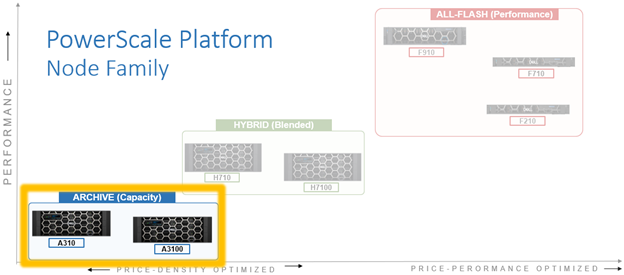
The family diagram was one of the first things that made the portfolio click - archive for density, hybrid for the middle ground, all-flash when you are paying for speed:
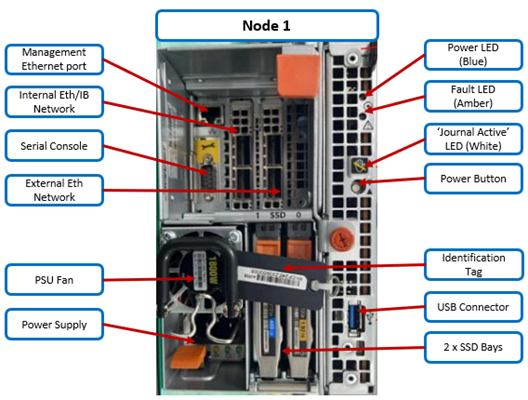
Looking at a node from the rear, you start to see it as a machine you might actually service rather than a black box in a rack diagram:
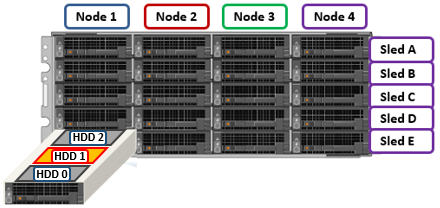
Failed drives are not abstract either. A chassis is four nodes left to right, sleds A through E top to bottom, and each sled holds multiple drives. When the alert says “node 1, drive E1”, this is what that means:
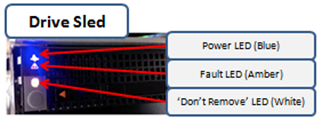
Blue and orange touchpoints on the hardware docs start to matter the first time you are standing in front of a live chassis: what you can pull hot, what waits for a quieter moment, and which LEDs mean “leave that sled alone”.
What “day to day” actually means
A surprising amount of the work is not exotic.
Failed drives show up with a bay and a sled here and there... You learn the LED language on the chassis, the difference between a healthy bay and one stuck in REPLACE, and that formatting a drive is sometimes only half the story - the drive daemon has opinions too. InsightIQ (and similar capacity views) become the weather forecast: not just how full you are, but why you are full.
Shares are their own universe. Creating one is rarely “make a folder and share it”. There are permission models, DFS namespaces for failover-friendly names, scripts that place home directories, and the eternal question of whether the caller is coming in over SMB, NFS, or something else entirely. Access zones matter more than I first thought. Get the zone, the auth provider, and the user mapping wrong, and the share looks fine in the UI while clients get nonsense at the wire.
Then there are the adjacent products that make the filestore usable to humans who will never SSH into a node:
- SnapshotIQ for point-in-time recovery - and for learning, quickly, that the wrong analysis mode can quietly eat an alarming amount of snapshot capacity...
- SyncIQ for moving data between sites (and sometimes for shuffling data locally when that is the least bad option).
- Superna tooling around DR orchestration and ransomware-aware monitoring - the sort of stack you upgrade carefully with vendor eyes on a call, after you have backed up the awkward exception lists - I will remmeber to do that next, time.
None of that is glamorous. All of it is load-bearing.
Growth and change
Clusters do not stay still. New nodes arrive, join a pool by type, and force conversations about tiers, file pool policies, and licences. Compression and dedupe show up as defaults on newer platforms and change how you think about “raw” versus “usable”. You start reading release notes for firmware and OneFS the way other people read weather warnings.
Upgrades have their own ritual. Tools like IOCA tell you whether the cluster is healthy enough to move, and whether your intended path is sane. Capacity thresholds matter - a cluster that is too full will refuse to play. Rolling versus parallel updates stop being abstract words and become “how many nodes am I willing to have in flight at once”. Patch the passive side first when you can. Write things down. Assume you will need the notes at 2am.
What I have actually learned
Enterprise storage is a trust machine. Users trust that files are there, that yesterday’s version exists, and that a building problem on one site is not the end of the story. Your job is to keep that trust boring.
Documentation is part of the product. The notes that got me through the last few months were not clever blog posts. They were paths, orders of operation, “do not power this on yet”, and which pool a SyncIQ policy must use. Future-you is a stakeholder.
Small config choices have large blast radii. Snapshot settings, FSA modes, allowlists on NFS exports, Globus service-account ACLs - none of these fail loudly on day one. They fail as a ticket three weeks later with a vague symptom.
Vendor support is a skill. Redeployments, Eyeglass upgrades, node onboarding with an engineer on site - half the work is preparation and the other half is not improvising while someone is watching.
Automation is how you stay sane. A lot of filestore life is API-shaped: creating shares, placing homes, cleaning up accounts past retention. Manual clicks do not scale to thousands of directories.
You are always balancing capacity, risk, and change. New density and efficiency sound great until you are mid-upgrade with replication still running and a research group asking why their share feels slow.
Still early
A few months in, I am nowhere near “done” with PowerScale. I am past the stage of treating OneFS as a black box with a web UI, and into the stage where the mental model has layers: nodes and pools, zones and exports, snapshots and SyncIQ, then the constellation of products that sit around the cluster so people can actually use it.
Sysadmin work at this scale is less about heroic saves and more about careful repetition - check the drive, check the policy, check the other site, write it down, do the next one. That turns out to be the interesting part.